
Request signature is where you say who should sign, by when, and how.
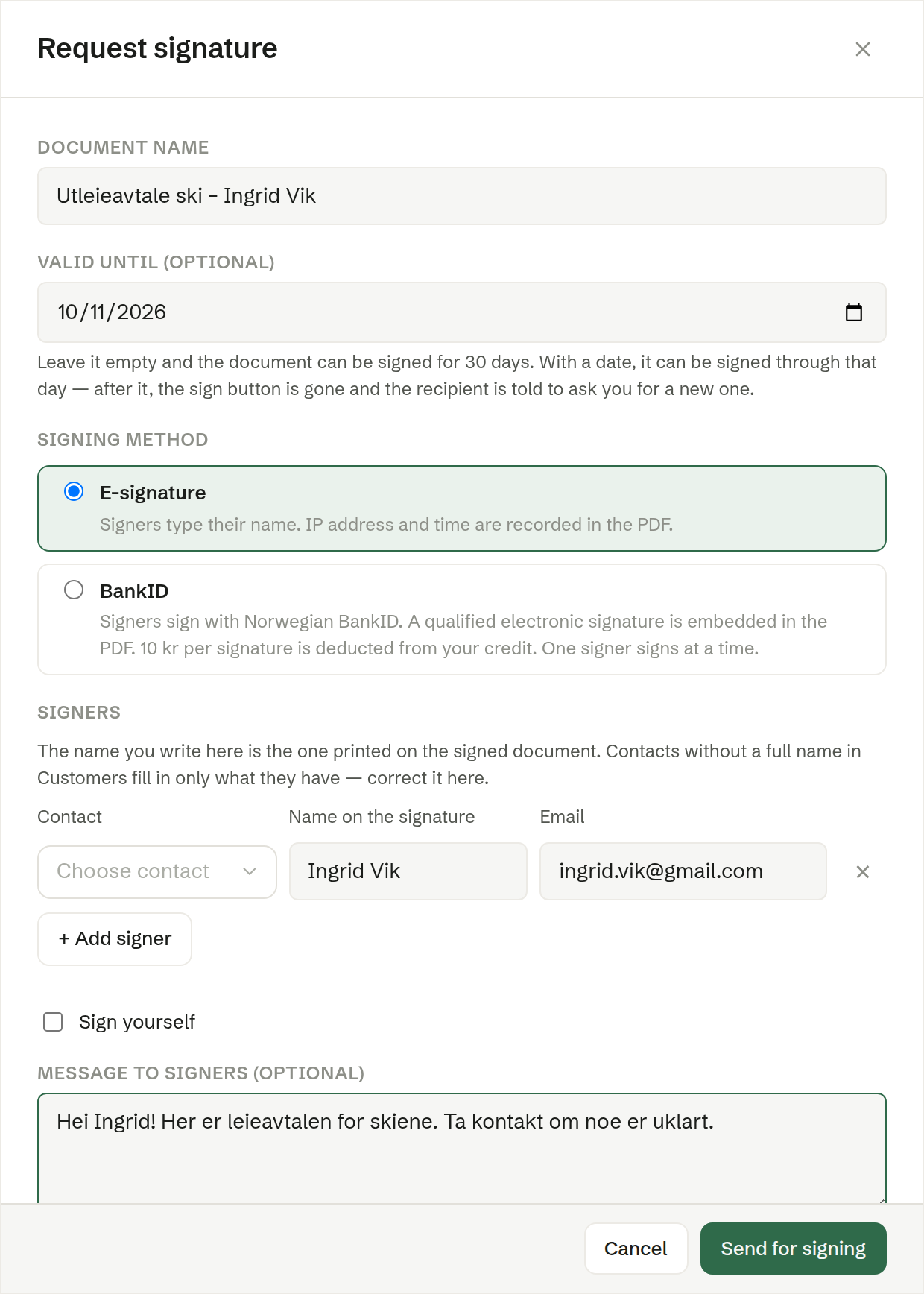
Document name
The name signers see in the invitation and on the document. Suggested from the document; change it if you like.
Valid until (optional)
The last day the document can be signed. Empty by default: the document can then be signed for 30 days. With a date, it can be signed through that day; after it, the sign button is gone and the signer is told to ask you for a new one. You can move the date later. See Changing the deadline.
Signing method
Shown when BankID is available: E-signature (the default) or BankID. See Signing methods. Only in Norway
Signers
One row per signer:
- Contact — pick a person from Customers, or type a name or address and choose Create to add them as a new contact. Picking a contact fills in the name and email.
- Name on the signature — the name printed on the signed document. Correct it here if the contact's name is incomplete. Left empty, it is taken from the email address.
- Email — where the invitation goes. Every signer needs one.
+ Add signer adds a row; × removes one. Up to 20 signers.
Sign yourself
Tick Sign yourself if you are signing too, and check the name. You sign in the document itself, in Brigg — you get no email.
Message to signers (optional)
A short note included in the invitation email.
Sending
Click Send for signing. Each signer gets an email with a private link, the document is locked, and the signing moves to Pending. If an invitation could not be delivered, Brigg says which address failed.