
Every time an automation runs, Brigg writes it down. Click an automation's name in the list to open Runs, its log.
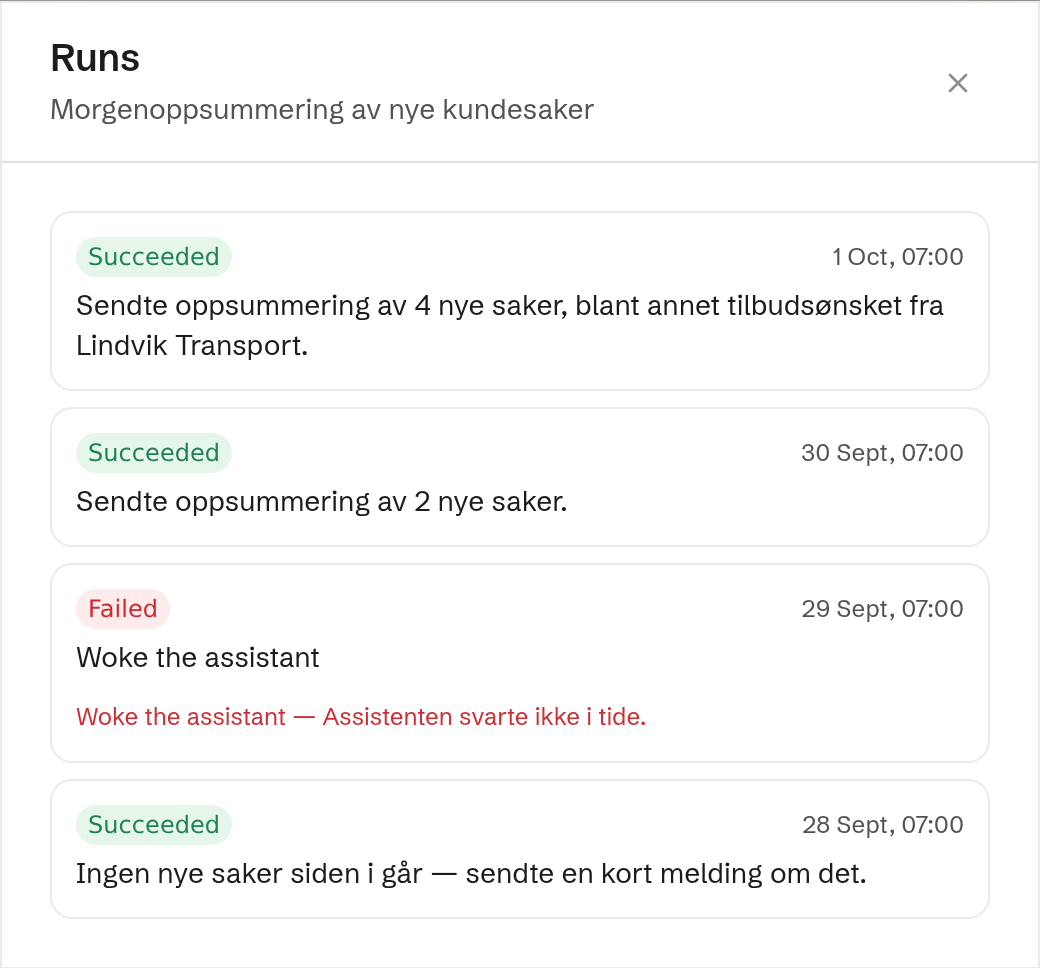
What each run shows
Newest first, up to the latest 50:
- The result — Succeeded, Partial (some actions worked, some did not), Failed or Skipped (there was nothing to do).
- When it ran.
- What it did — the agent's own one-line note when the run woke the agent, otherwise the actions that ran, such as «Sent message · Updated record».
- What went wrong, for a run that did not succeed: which action failed and why.
The latest result is also shown in the Last run column of the automations list, so a rule that keeps failing stands out without opening it.
Undoing a run
Every change an automation makes to a record is recorded. If a run did the wrong thing, ask the agent — for example «undo what the clean-up rule did last night». It puts every record that run changed, deleted or shared back to how it was before, and tells you how many came back. Any record it could not restore is named, not skipped silently.
A run can be undone for 30 days. After that, the earlier versions are gone.
Who can do what
You see the log of your own automations. Owners and administrators see the company's automations too. You can undo a run of your own automations; owners and administrators can undo a run of any automation.