
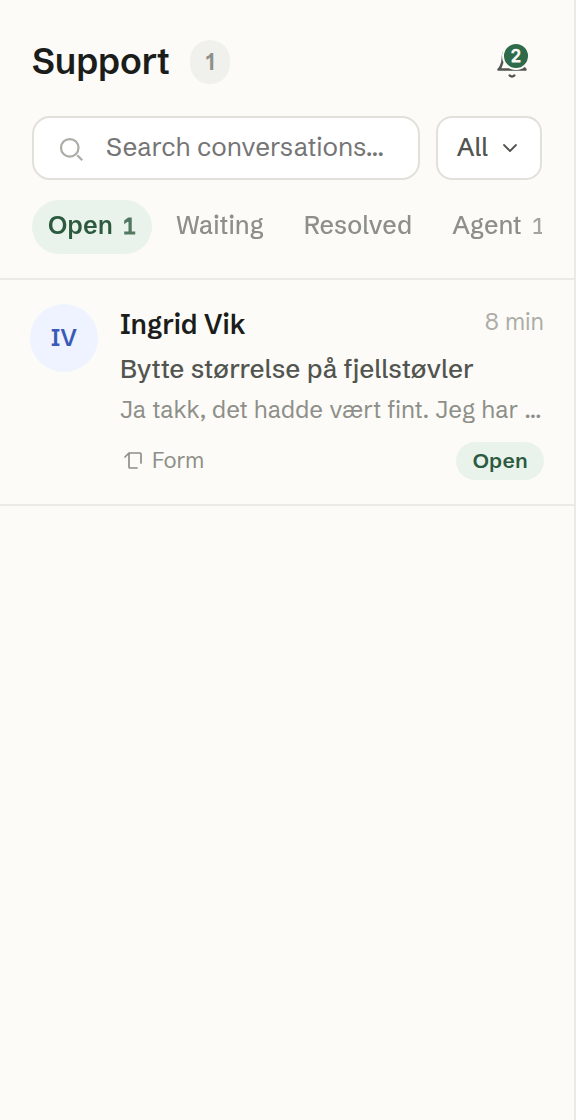
The tabs
Every conversation is in exactly one tab:
- Open — cases a person on the team needs to deal with: the agent has handed them over, or someone has taken them.
- Waiting — cases waiting for something, usually an answer from the customer.
- Resolved — cases marked as resolved or closed.
- Agent — the agent's own desk: new enquiries the agent is handling and has not handed over. A finished phone call lands here too, unless the agent handed it over during the call.
The number of conversations shows on the tab you are on, and always on Agent. When something you do moves the open case to another tab — answering a case on the Agent tab makes it Open, for example — the list follows it and tells you where it went.
Filtering and searching
- Search conversations… searches names, subjects, message text and company names in the tab you are on.
- The filter button narrows the list to All, Mine (assigned to you) or Unassigned. It does not apply on the Agent tab, where everything is unassigned.
Each row
A row shows the customer's picture or initials and name (or Unknown), how long since the last activity, the subject, the start of the latest message — marked when the agent handled it — the channel (Email, Web chat, Form, SMS or Phone), the company and the status. Resolved and closed conversations are dimmed. The newest activity is at the top.
Statuses
- New / Unassigned — not answered yet; Unassigned when nobody has it.
- Open — being dealt with.
- Pending — waiting.
- Resolved and Closed — done.
The bell
The bell at the top of the list shows your notifications. See Notifications.