
A scheduled newsletter is one recurring newsletter, for example «Månedsbrevet», which the agent writes on a rhythm. You choose how often, who receives it and where the agent finds material. Each issue keeps the design of the last one, and is either waiting for you to approve it or sent automatically.
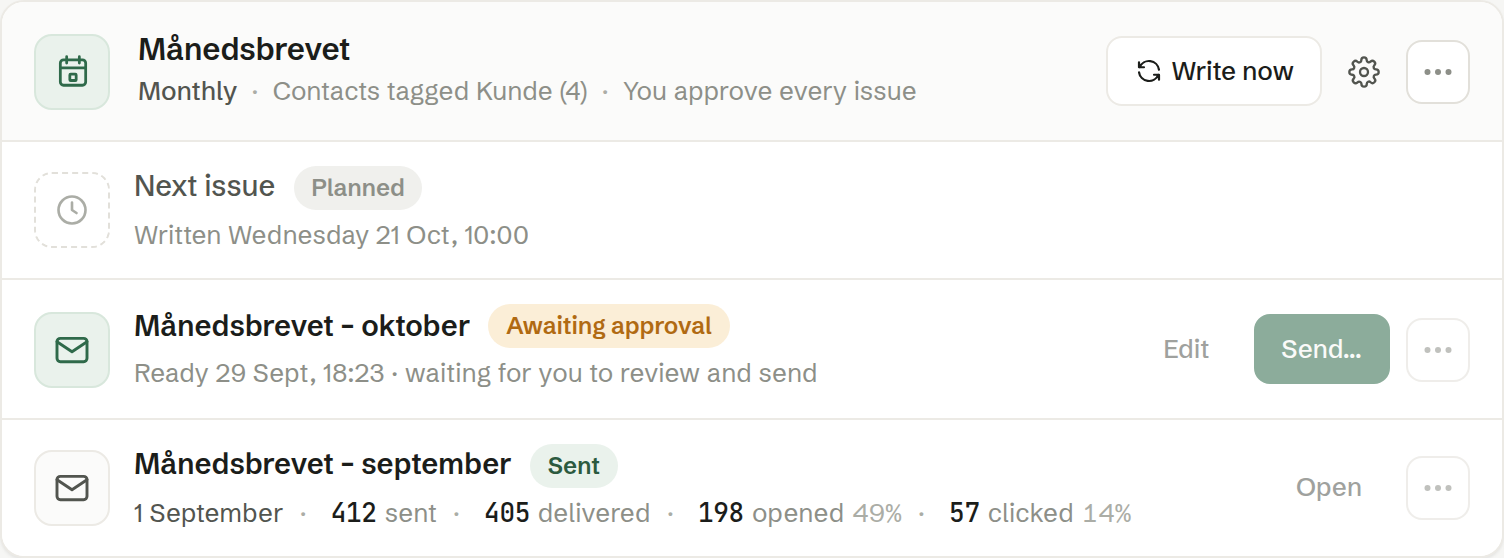
The card
Each series is a card on the Scheduled tab. The top line says how often it is written, who receives it and whether you approve each issue. Paused is shown by the name when the series is paused.
- Write now — writes a new issue at once, without changing the plan. Hidden while an issue is being written.
- The gear — the series' settings. See Settings for a scheduled newsletter.
- ⋯ — Pause or Resume, and Delete schedule. Deleting stops new issues; the issues already made stay as ordinary newsletters.
The issues
The first row is the Next issue, with when it will be written. Below are the issues that exist, newest first, each with its status:
- Being written… — the agent is at work. Follow along opens the issue as it takes shape.
- Awaiting approval — ready for you. Edit opens it; Send… opens the send dialog with the series' recipients already filled in.
- Sending soon — ready, and goes out automatically.
- Sent — with the figures of the send. The ⋯ menu leads to its statistics.
- Failed — with the reason. Try again writes the issue again.
When an issue that needs approval is ready, the person who set up the series also gets an email.