
When a recorded meeting ends, Brigg writes the summary within a minute or two. It is written in the language the meeting was held in.
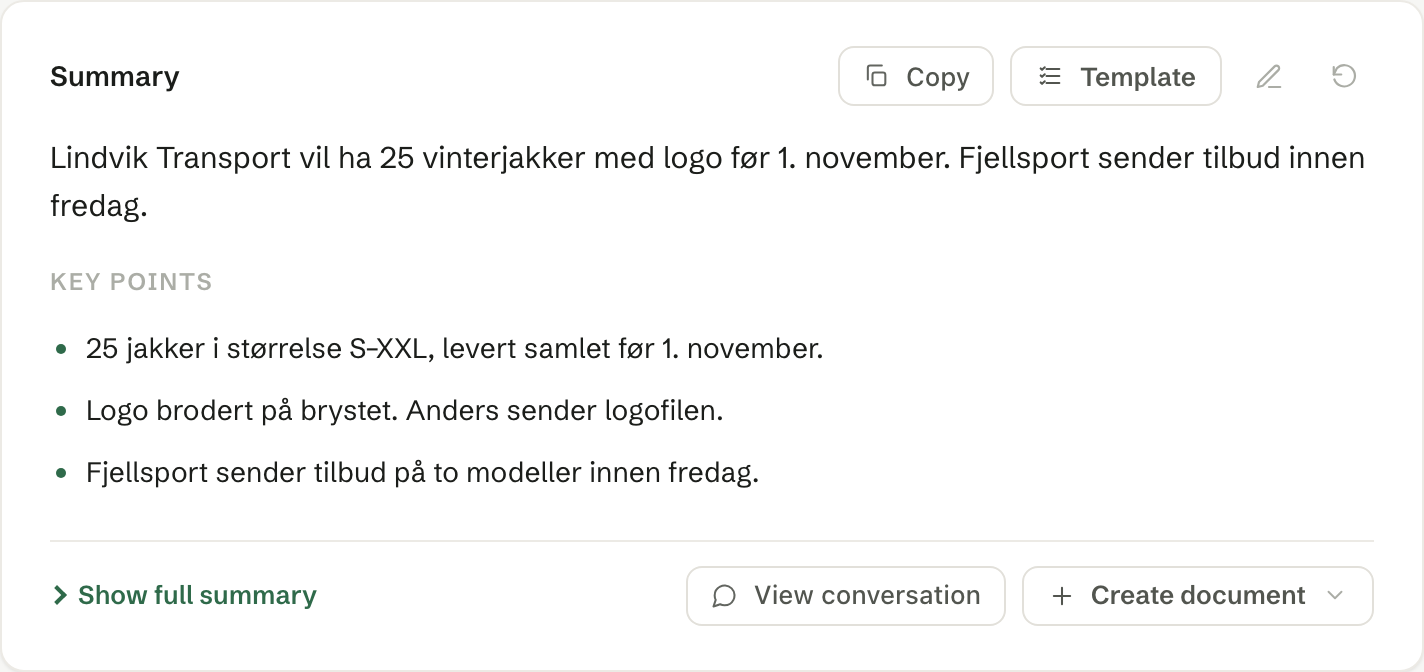
What it contains
- The gist — the core of the meeting in one or two sentences, at the top.
- Key points — the most important points as a short list.
- Show full summary — a longer write-up in sections, about one page.
The tasks agreed in the meeting become follow-ups below the summary.
Buttons on the card
For everyone who can see the meeting:
- Copy — copies the summary, with the title and time, to paste elsewhere.
- Send email — sends a message and the summary to the attendees. See Sending the summary by email.
- Create document — writes a document from the meeting: pick a template from Documents, an existing document or a file to start from. It appears under Documents on the card when it is ready and is saved in your own documents. Click its name to open it, or PDF or Word under the name to download it.
For the host — the person who recorded the meeting:
- Template — rewrites the summary following one of your meeting templates.
- Edit the summary (the pencil) — edit the gist, the key points and the full summary, then Save.
- Regenerate the summary (the round arrow) — writes the summary again from the transcript.
- View conversation — the whole transcript. Here you can also Edit speaker names when a voice is labelled wrongly, and Copy conversation.
When there is no summary
The card says why: nothing was said, the transcript did not come through, or there was not enough credit when the meeting ended. In the last case, top up and use Regenerate the summary.
Deleting
Under More actions (the three dots), the host can:
- Delete conversation — deletes the transcript for good. The meeting and the summary stay, but the summary can no longer be written again.
- Delete meeting — removes the meeting and its summary for the whole team.
How long transcripts are kept can also be set for the whole workspace — see Privacy for the workspace.