
A booking link is a web page with your free times. Whoever has the link picks a time and books; the meeting is put in your calendar with an invitation to them, and shows up in Meetings — prepared like any other meeting, with the person added as a contact in Customers. Open Booking under Meetings in the left-hand menu.
Before you start
Booking puts meetings in your own calendar, so it needs a connected calendar with Create calendar invites as you allowed. Until then, the page says so and Grant calendar access takes you there. See Connecting your calendar.
Your links
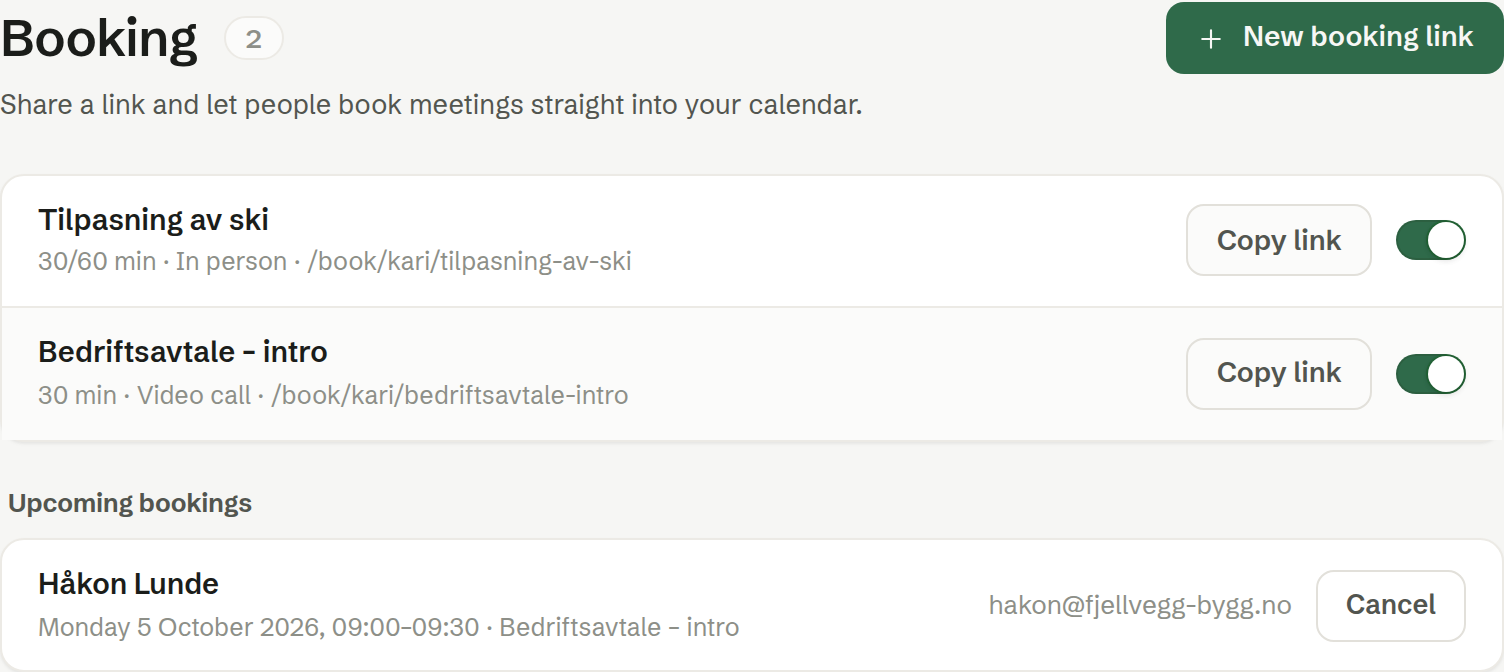
Each person has their own links, as many as they like. Each row shows the length, the meeting type and the link's address.
- Copy link copies the address to paste into an email, your signature or your website.
- The switch turns the link on and off. A link that is off is marked (paused), and its page cannot be booked.
- Click a link to change it. See Setting up a booking link.
- What someone opening the link sees: see The booking page.
New booking link creates one.
Upcoming bookings
The meetings booked through your links, soonest first, with the person's name and the time. Cancel cancels a booking; both of you are told by email, and it is removed from your calendar.
A booked meeting also appears under Upcoming in Meetings. Deleting it there does not cancel the booking — cancel it here.
The agent
The agent knows your active links, and offers one when someone asks to meet you, instead of agreeing a time back and forth. Creating and changing links is done here.