
The card How the agent answers on the phone page sets how calls are handled. The inbox's playbook always applies; what you write here is added to it for calls only.
Language
Language is the language the agent answers in. Norwegian is available today. The voice is chosen by Brigg.
Instructions
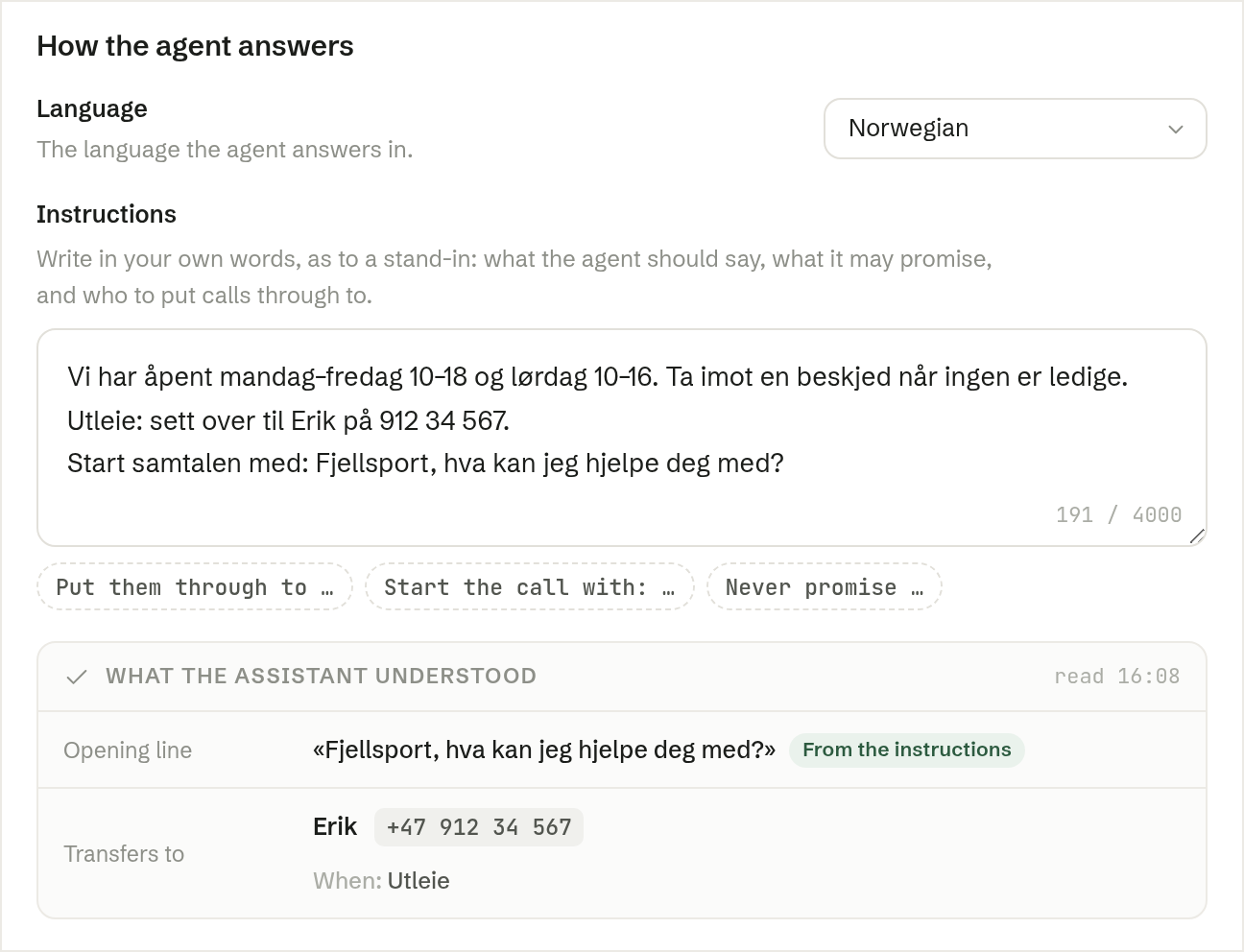
Under Instructions, write in your own words, as to a stand-in: what the agent should say, what it may promise, and who to put calls through to. For example:
We are open Monday–Friday, 10–18. Take a message when nobody is available. Rental questions: put them through to Erik on 912 34 567.
The buttons under the field start a line for you to finish: Put them through to …, Start the call with: … and Never promise …. Instructions can be up to 4000 characters.
When you have made changes, the card says they are not saved yet — the agent keeps answering with the previous version until you press Save, or Discard to throw them away. Saved instructions are used from the next call.
What the assistant understood
Once the inbox has a number, the card shows what the agent read from your instructions:
- Opening line — what it says when it picks up, marked From the instructions or Default.
- Transfers to — each person or number it can put callers through to, and when.
If it found nobody to transfer to, it says so and shows an example of how to write it. Read this after every change: it is how you know the agent understood you.